
How to Choose the Best Cable Management Systems?
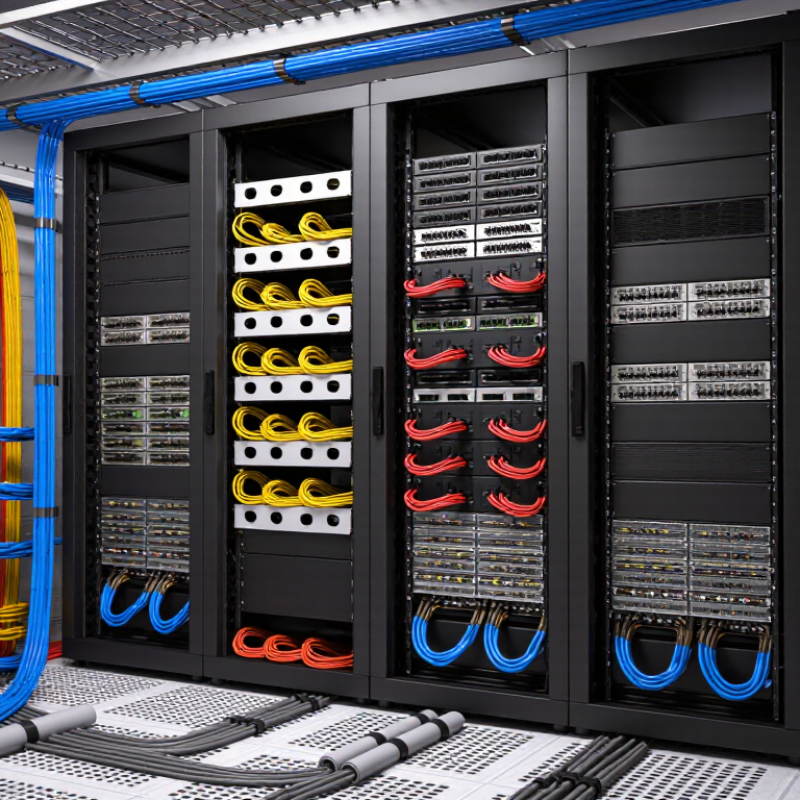
Choosing the right cable management systems is more than an aesthetic decision. It affects airflow, equipment access, signal reliability, and future maintenance. A crowded rack may still function today, yet become difficult to service tomorrow. That hidden cost matters.
Ron Tellas, Technical Manager at Belden and a recognized cabling specialist, has stated, “Cable performance depends on the installation environment.” His observation reflects a practical truth. Even high-quality cables need proper routing, separation, support, and bend-radius control. The best cable management systems should match the cable type, rack design, installation space, and expected growth. Fiber cables require different handling from copper cables. Power cables may also need separation from data lines to reduce interference risks.
Look closely.
This guide explains how to compare vertical managers, horizontal panels, raceways, trays, sleeves, and underfloor solutions. It considers capacity, materials, ventilation, labeling, tool access, and long-term flexibility. For example, a 42U rack with dense patching needs more than a narrow plastic channel. It needs clear pathways and enough spare capacity for future changes. That point is easy to overlook.
There is no universal solution. A small office, a data center, and a manufacturing floor face different pressures. Budget also influences the decision, sometimes too strongly. Cheap components can create sharp bends, loose cables, or repeated maintenance work. Experienced installers know that neatness is useful, but serviceability is more important. The right choice balances current needs with realistic expansion, safety, and dependable performance.
Classify Cable Types and Routing Goals Using IEC 60228 Conductor Classes
How to Choose the Best Cable Management Systems?
IEC 60228 offers a practical starting point for cable classification. Class 1 conductors are solid and usually suit fixed, simple routes. Class 2 conductors are stranded but remain relatively rigid. They work well in fixed installations where moderate flexibility helps during termination. Class 5 conductors are flexible and support tighter routing or repeated adjustment. Class 6 conductors are extra-flexible and fit equipment with frequent movement. The conductor class does not describe the entire cable.
Cable management should match both cable behavior and routing goals. For Class 1 and Class 2 cables, rigid trays, ducts, or organized conduit runs can provide stable support. Avoid forcing sharp turns during installation. Class 5 cables may need wider bends, smoother entry points, and fewer compression points. Class 6 cables often require flexible carriers or guided movement systems, especially near robotic equipment or moving panels. Always check the cable’s stated minimum bend radius. IEC 60228 alone cannot provide that value.
In field inspections, I have seen tidy routes fail because installers grouped cables without considering movement. A clean appearance is not enough. Separate power and sensitive signal cables when interference could affect operation. Secure heavy cables without crushing their insulation. Leave measured space for heat dissipation and future maintenance. My own earlier assumption was simple: more clamps meant better control. It was wrong. Excessive restraint can prevent flexible cables from moving naturally and accelerate wear. A sound system supports the cable, preserves its bend radius, and reflects its actual conductor class.
Calculate Fill Capacity with NEC 392.22 Limits and Bend-Radius Data
How to Choose the Best Cable Management Systems?
Calculate tray fill before choosing a cable management system. NEC 392.22 sets different limits for cable types, sizes, and tray arrangements. For many single-conductor cable applications, the combined cable area cannot exceed 40% of the tray’s usable interior area. Multiconductor cable rules may allow different percentages, so never apply one limit blindly.
Measure the tray’s internal width and usable depth. A 12-inch-wide tray with 4 inches of usable depth provides 48 square inches. At a 40% limit, the permitted cable area is 19.2 square inches. Calculate each cable area with π × diameter² ÷ 4, then add the results. Use the actual cable diameter, not the conductor size alone. Small errors matter.
Bend radius matters too. Check the cable’s minimum bend radius from reliable technical data, then select elbows and fittings with equal or greater radius. A tight turn can damage insulation, increase pulling tension, or create maintenance problems. Keep cables separated where heat or signal performance requires it. Leave practical working space when future circuits are likely. It is tempting to fill every available inch. That choice often looks efficient until one cable must be replaced. I have seen spreadsheets pass the fill calculation while the physical bend was impossible. Recheck the design at the tray entrance, exit, and every change in direction. Confirm the current NEC edition and local inspection requirements before installation.
Compare Trays, Raceways, Ducts, and Sleeves by Access and Density
Choosing a cable management system starts with access and density, not appearance.
In cabinet audits, trays work well when technicians need frequent access and visible separation. They suit overhead routes carrying mixed power, data, and control cables. However, open trays collect dust and demand accurate support spacing.
The Uptime Institute’s 2023 Global Data Center Survey reported that 60% of respondents experienced an outage within three years. Poor routing rarely causes every outage, but difficult maintenance can increase human error.
Raceways provide stronger protection in offices, corridors, and exposed industrial areas. They hide cables and resist accidental impact, yet expansion becomes slower after installation.
Ducts offer higher density and cleaner organization, especially inside panels. Their covers allow inspection, but tightly packed ducts can trap heat and make tracing difficult.
TIA-569-E pathway guidance emphasizes usable capacity and separation, rather than simply filling every available space. More cables are not always better.
Sleeves are flexible for short runs, moving equipment, and under-desk connections. They are inexpensive and quick to adjust. They also become messy when too many cables share one sleeve.
My first choice is often wrong. A route that looks efficient during installation may frustrate the next technician.
Leave spare capacity, label both ends, and test bend radius before closing any cover. The 2022 AFCOM State of the Data Center report also highlights rising cable density as a continuing infrastructure challenge, making future access a practical design requirement rather than a cosmetic preference.
Verify Fire, Electrical, and EMC Safety with UL 94 and IEC 61537
How to Choose the Best Cable Management Systems?
Choosing a cable management system starts with its safety evidence, not its appearance. In real installations, trays face heat, dust, vibration, and accidental impact. UL 94 helps evaluate how plastic materials react to flame. Ratings such as V-0, V-1, and V-2 indicate different burning behaviors. However, UL 94 does not certify the complete cable system. Check the exact material, thickness, and test conditions. A higher rating is not automatically better for every installation.
IEC 61537 focuses more directly on cable management systems, including trays, ladders, supports, and mechanical performance. It can address load capacity, corrosion resistance, protective bonding, and electrical continuity. These details matter when metal sections must support fault-current paths. Poor connections may increase impedance and weaken electromagnetic compatibility. Keep bonding jumpers short, clean contact surfaces, and verify continuity after installation. Small gaps can create large problems.
Experienced installers also inspect bend radius, fill levels, fasteners, and separation between power and signal cables. Measure the route before ordering components. This prevents crowded trays and forced cable bends. Ask for test reports, installation limits, and material declarations from qualified suppliers. Laboratory results are useful, but field conditions can differ. I have seen carefully rated materials fail when supports were spaced incorrectly. That mistake is easy to repeat. Recheck the design under heat, vibration, and future cable additions.
Match IP Ratings and Materials to Temperature, Moisture, and Corrosion
How to Choose the Best Cable Management Systems?
Cable management should match the environment, not just the cable size. Check the required IP rating before selecting glands, conduits, or junction accessories. IP65 can resist dust and water jets, while IP68 suits equipment exposed to temporary or continuous immersion. Confirm the test conditions carefully. Ratings can be misunderstood.
Temperature changes also affect material performance. Nylon may suit indoor installations, but harsh heat, sunlight, or chemicals can reduce its service life. Stainless steel handles demanding industrial areas and resists corrosion better than many common metals. However, it can still suffer in salty or chemically aggressive environments. Material selection is rarely perfect. Field conditions often prove more complicated than specifications.
Tips: Inspect the installation area during its wettest and hottest periods. Record temperature, humidity, cleaning chemicals, and exposure to salt. Choose seals that remain flexible at the lowest expected temperature. Leave enough bend space around cable entries. Recheck every rating against the manufacturer’s technical data and applicable testing standards. A small mistake here can allow moisture inside. That failure may remain invisible until corrosion begins.
Conclusion
Choosing the best cable management systems begins with understanding the cables, the installation environment, and the project’s future requirements. Classify conductors according to IEC 60228 conductor classes, then define routing goals such as separation, protection, accessibility, and signal integrity. Estimate tray or raceway fill capacity using NEC 392.22 limits, while also checking minimum bend-radius requirements to prevent mechanical stress and performance loss. Compare trays, raceways, ducts, and sleeves based on cable density, ease of access, ventilation, and the expected frequency of maintenance or expansion.
Safety and durability should guide the final selection. Verify fire behavior, electrical protection, and EMC performance using relevant UL 94 and IEC 61537 considerations. Select IP ratings and construction materials that suit temperature changes, moisture, dust, chemicals, and corrosion risks. Finally, evaluate installation time, spare capacity, adaptability, maintenance effort, and total lifecycle cost. A well-planned system should not only organize cables neatly but also support safe operation, efficient troubleshooting, future upgrades, and reliable long-term performance.
Related Posts
-

How to Choose the Best Cable Management Systems for Your Home?
-
What Are Cable Management Systems and Why Use Them?
-
What is Cable Management Systems? Benefits and Best Practices Explained
-

2025 Top Trends in Cable Baskets: Essential Guide for Organizing Wires
-

Ultimate Guide to Innovative Cable Holder Solutions for a Clutter Free Space
-

Digital Cable Management Best Practices for Clean Setup?